A visual editor for Snowflake physical data models
Data Modelling Tool is a Public Beta editor for physical data models for Snowflake. Projects define their own table roles and naming conventions, so the same editor supports modelling approaches such as Data Vault and data marts. Model files are processed locally as XML in your browser, with no account and no server storage.
This page reads on any device. Editing a model needs a desktop browser — see verified capabilities and limits below.
Who it's for
Data engineers, architects, and analysts designing physical data models for Snowflake — for example a Data Vault 2.0 layer of hubs, links, and satellites, or a data mart of fact and dimension tables — who want a lightweight diagramming tool that runs entirely in the browser, with no signup and no server to manage.
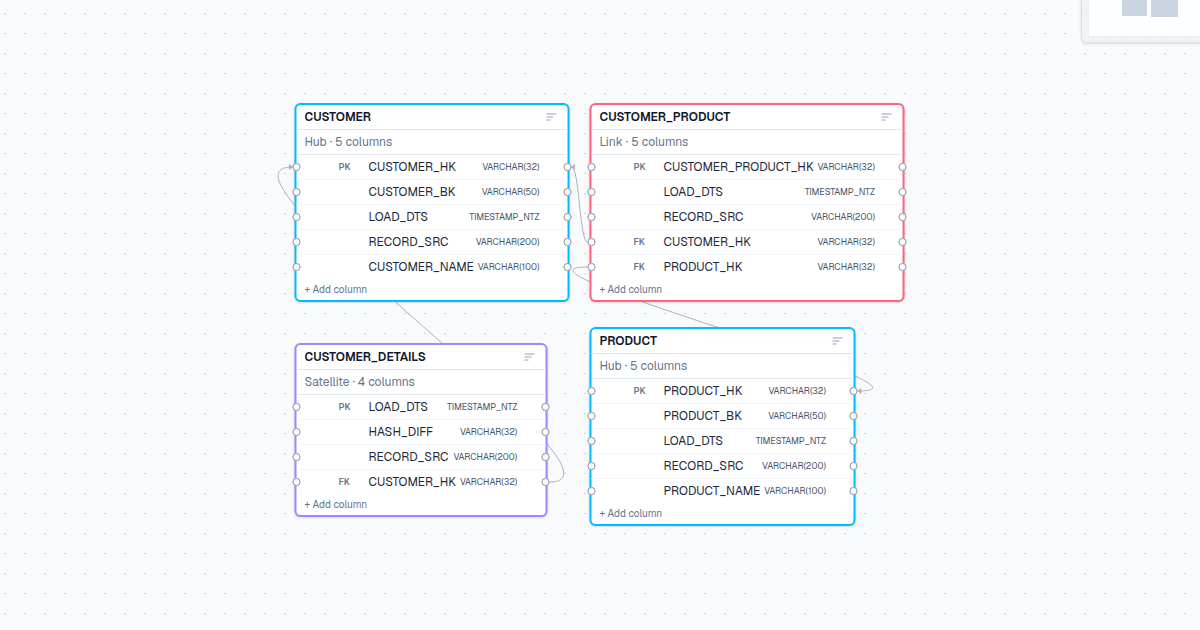
The diagram canvas
From a new model to a saved file
- Name your model on its tab, or start with the empty model the editor opens with.
- Choose New Table, name it, and optionally pick a role — Hub, Link, Satellite and Reference are editable starting templates, not fixed structures.
- Select the table to open its Inspector, then add and edit columns and mark primary-key columns.
- In a child table's Inspector, add a foreign key and map its columns to the parent's key to connect tables.
- Open View → Validation to review built-in checks, and Settings → Team rules for custom validation.
- Use File → Save As to write a local XML file, and File → Open to load it again later.
Verified capabilities and limits
What works today
- Configurable table roles (Hub, Link, Satellite, Reference) with editable column templates and naming conventions
- Diagram editing with undo/redo, search, filtering, and automatic table arrangement
- Built-in and custom team-rule validation, including reusable rule packs
- Local XML model files: save, open, and continue editing later
- Snowflake DDL export: preview, copy, or download generated SQL
- Snowflake DDL import: load supported CREATE TABLE statements into an editable model
Current limits
- Public Beta: behavior and scope can still change before a stable release.
- Designed for desktop Chrome and Edge; mobile devices and other browsers are not guaranteed.
- No accounts, project sharing, or server-side storage — models exist only as the XML files you save.
- Models are not saved automatically; save before closing or refreshing the page and keep your own backups.
Data handling and privacy
Model files are processed locally in your browser as XML. They are never uploaded to a server as part of using the editor — save your own backups, since nothing is stored for you.
Optional, fixed-name product usage analytics is disabled by default. When enabled, it records which features are used as fixed event names only — never model contents, file names, SQL, or text you typed. Separately, Cloudflare measures site visits; it does not read model data either.
Tutorial
A step-by-step Snowflake modelling tutorial with a downloadable example file is in progress. A link will be added here once it is published.